

I’m in the very fortunate position that I review gaming controllers for a living, but all of them today have their own dedicated companion software, so it means I’m constantly downloading new PC apps to help me test all of their features. I’m going to be honest, things are getting pretty silly. More than one brand I can think of has multiple different applications for all of its controllers. So one bit of GameSir software that works with one of its controllers might not with another. The best PC controllers certainly get a lot out of companion software like this, but downloading and using it can feel like a faff when you just want to unbox and get playing.
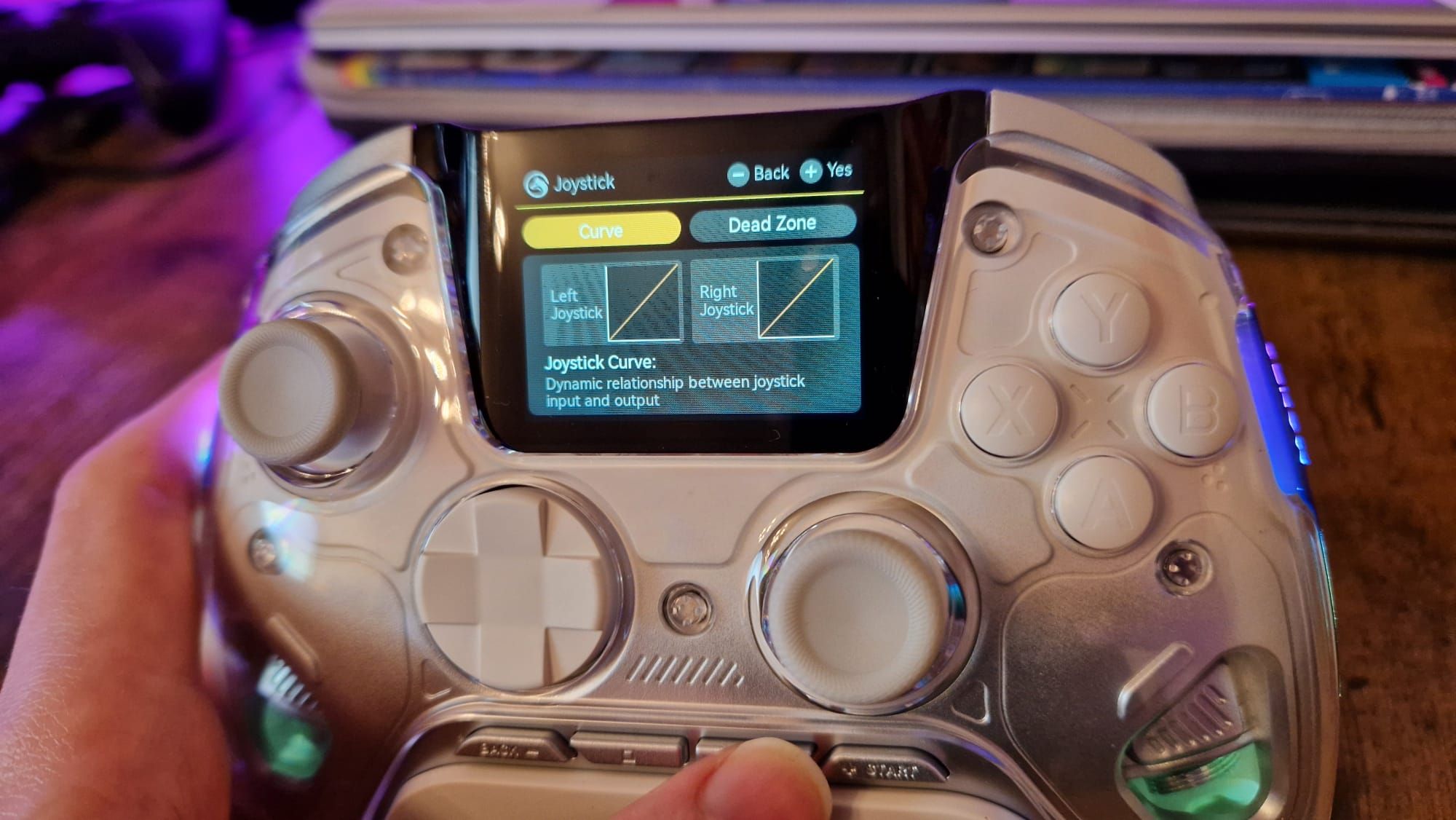
That’s why testing out the Manba One was such a refreshing experience. A lot of controllers have tried to cut the middleman of companion software by integrating a screen and a user interface straight onto the device. But there have been so few that have managed to make one actually useful because the on-board menus end up feeling way more limited than a companion app would be. The Manba One is an outlier because its larger on-board display gives you everything you need to customize the gamepad to the finest detail.
I haven’t tested a controller before or since that’s felt so streamlined when it comes to customization – nor one that’s made its integrated screen feel so bloody useful. In fairness, a lot of users might not even need to download companion software if they aren’t interested in getting into the nitty-gritty deadzone details. Most of the time, assigning extra buttons can be done via some clever hot-key combinations, so if that’s all the customizing you want to do, feel free to zone out and continue on with your scroll through the internet.
But there’s an unreal benefit of having a much more powerful customization suite literally at your fingertips at all times. Even if you wouldn’t naturally think of wanting to adjust your deadzones, or even if you don’t know what difference deadzones make to your gameplay, having the option to adjust them so easily accessible means you’ll probably be inspired to give it a try.

If anything, this just means you can actually get the full worth out of your pro controller, so in that way, I’d argue the Manba One has better value for money than a lot of the gamepads that land on my desk.
The menu you access on the controller allows you to sort between 3 PC profiles on its on-board storage. Each profile has a sub-menu that allows you to adjust button layouts, trigger deadzones, thumbstick deadzones, and rumble levels. There’s then a separate profile for when you’re using it as a Nintendo Switch controller.
It’d be easy for the Manba One to coast on this one feature, allow it to be a gimmick, and call it a day, but that isn’t the case. The Manba One hasn’t stuck around in my shortlist of favourite controllers just because of its big screen; it’s a great controller without that first and foremost.

It has microswitch buttons that feel really responsive for its sub-$100 price, it has Hall sensor thumbsticks and triggers, comes with swappable thumbstick tops, and it has four back buttons (something which more prestigious controllers from better-known brands don’t even have). It even has trigger stop switches as well. In terms of aesthetics, it comes in either a transparent/white model or in a black colorway, but RGB gives it even more definition in your setup.
Obviously, the alternative on everyone’s mind right now is the new Steam Controller, and for good reason. Valve’s latest bit of hardware has innovative trackpads (and other features) that make it unlike any other gamepad I’ve tested, but even it fails at the easy convenience of the Manba One.
To customize the Steam Controller, you need to create profiles for it on a per-game basis. This means that every time you want to assign a back button or adjust one of its aspects, you need to come out of your game, enter the Steam controller menus, which really aren’t the best, and adjust pretty granularly. If you want that setting to save across each game you play? Too bad, you’ll need to set it up for each individual game in your library. It doesn’t even have on-board profiles that you can switch between with button combinations; it’s all configured by the Steam menus when you launch a new game.

The Manba One’s onboard UI is almost the antithesis of the Steam Controller’s convoluted adjustment system, because the menu is right in front of you at all times. You might need to put the controller in its adjustment mode to configure something, but the menus you’ll play around with are so well designed and easy to navigate that it feels way more intuitive than Valve’s system. As hard as that is to believe for a controller that’s nearly half the price, I’ve had hands-on time with both, and I know which I’d prefer to have to customize mid-gaming session.
For the record, I’m not sitting here trying to argue that the Manba One is a “better” peripheral than the Steam Controller. That’s a much more in-depth conversation to have, and there’s a lot more to weigh up. But I’d certainly say the Manba One makes its adjustments and settings menus more easily navigable and accessible than 90% of its competition on the shelves.
You might have more luck finding your dream controller if you head over to my list of the best PS5 controllers, the best Xbox Series X controller, and the best TMR controllers.
Gaming Controllers,Hardware#sick #downloading #controller #software #built #onboard #screen1779454690
